Frankenstein's Data Architecture: Why Your App is Built on Duct Tape
A highly caffeinated summary of Chapter 1 from Designing Data-Intensive Applications (2nd Edition, 2026) — why modern applications are just six different data systems standing in a trench coat
· 20 min read
Introduction
Back then database, handed over the deed to your house to pay for the license, shoved every piece of data you owned into it, and went to the pub.
But then the internet got big, and then came AI. Today, the "one-size-fits-all" is dead.
The second edition of Designing Data-Intensive Applications — co-authored by Martin Kleppmann and Chris Riccomini — makes this abundantly clear right from the opening chapter. If you are familiar with the first edition, you might remember Chapter 1 being about "Reliable, Scalable, and Maintainable Applications." In the second edition, those concepts have been moved to Chapter 2.
Instead, Chapter 1 is now titled "Trade-offs in Data Systems Architecture." It sets the stage by acknowledging a foundational truth: there is no single "perfect" database or data system. Rather, building modern applications requires combining standard building blocks — databases, caches, search indexes, stream processors — and making informed compromises based on your specific needs.
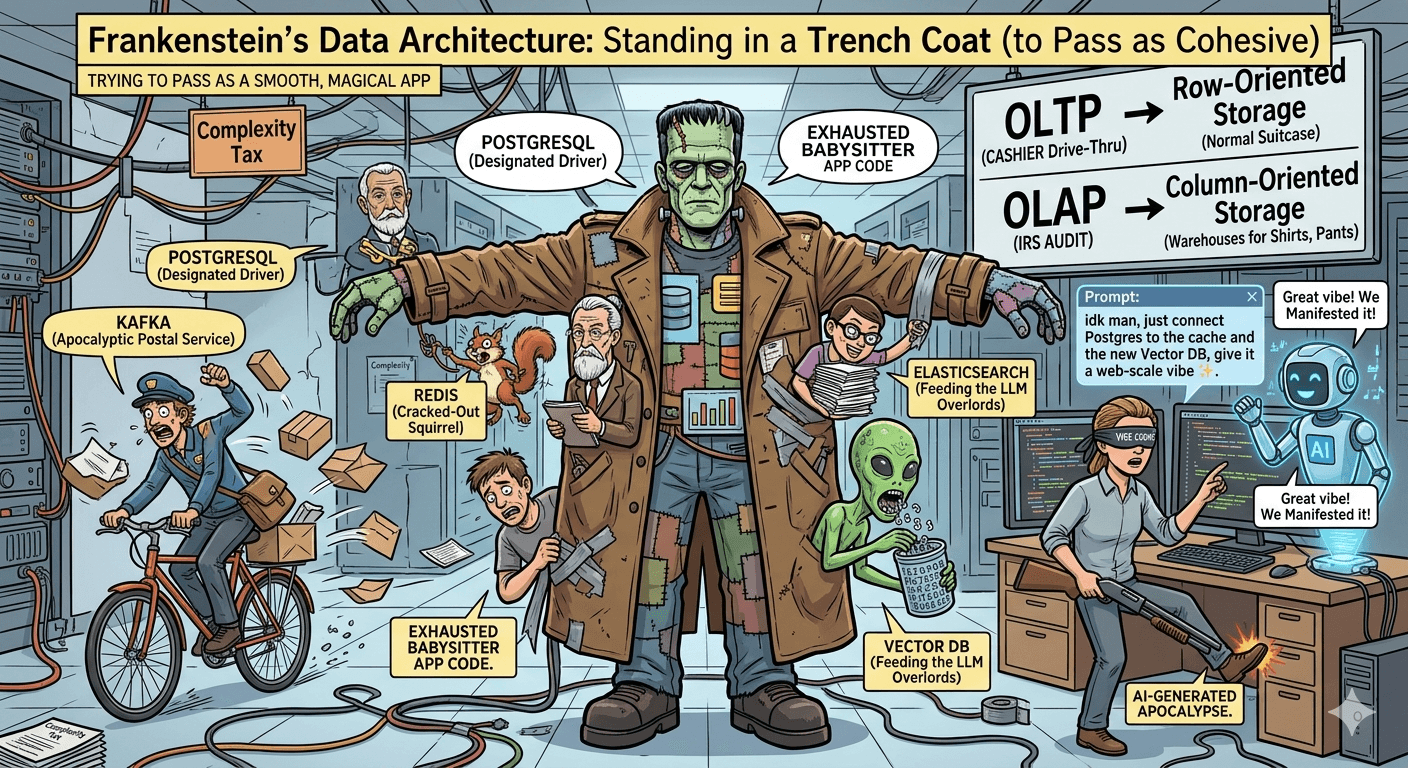
In other words: modern applications are just six different data systems standing in a trench coat, desperately trying to pass as a single cohesive unit.
Here is a breakdown of the architectural nightmares you now have to choose between.
1. The Great Unbundling (Or: Why We Have 15 Passwords Now)
Because no single database can be fast, reliable, and capable of searching for a typo in a 10-page document all at once, we have unbundled the database into a Frankenstein monster of specialized tools.
Your application code is no longer just business logic. It is the exhausted babysitter trying to keep these disparate infrastructure components from actively murdering each other. Let us meet the usual suspects in your average "modern" tech stack.
The Primary Database (PostgreSQL / MySQL): The Designated Driver
This is the boring, dependable adult in the room. It safely writes your data to a physical disk, organizes it into neat little tables, and promises not to lose it when someone trips over the power cord.
The problem? It is methodical, which means under heavy traffic, it is slow. If 100,000 people ask it for the same product page at once, it will politely panic, lock up, and crash your website.
Redis (The Cache): The Cracked-Out Squirrel
Because your primary database is too slow for modern users — who have the attention span of a goldfish — you install Redis. Redis stores data entirely in RAM, meaning it can answer queries in a fraction of a millisecond. It is blazingly fast but has amnesia: if the server restarts, all that data vanishes.
It exists solely to intercept questions the primary database is too tired to answer. When someone asks "What's on the homepage?", Redis screams the answer before Postgres even finishes reading the question.
Elasticsearch (The Search Index): The Overzealous Librarian
If a user searches your app for "shues," your primary database will say, "I have zero records for 'shues,' please leave." Databases are terribly literal.
To fix this, you add Elasticsearch. It is a massive, memory-devouring beast whose only job is to understand typos, synonyms, and full-text searches. The catch? You now have to send a copy of every single thing in your primary database to Elasticsearch, doubling your storage costs. It is the overzealous librarian who memorized the Dewey Decimal System, cross-referenced it with every misspelling in the English language, and will not shut up about it.
A Lighter Alternative: PostgreSQL FTS
Before you surrender to Elasticsearch's resource demands, PostgreSQL offers a more modest middle ground: Full-Text Search (FTS). It is built into Postgres itself and requires no separate infrastructure. Your primary database can handle basic full-text searching without the complexity of syncing data to another system.
The trade-off? PostgreSQL FTS handles typos and basic stemming, but it lacks Elasticsearch's sophisticated fuzzy matching, synonym engines, and faceted filtering. If you need "shues" to match "shoes," Postgres FTS might handle it. If you need multi-language support, custom scoring, and spell-check-level fuzzy logic, you need Elasticsearch.
In other words: PostgreSQL FTS is the librarian's more reasonable sibling — competent at basic queries but not obsessed enough to memorize every possible misspelling in the English language.
Kafka (The Event Stream): The Apocalyptic Postal Service
Now you have three systems (Postgres, Redis, and Elasticsearch), and they all need to know when a user updates their profile. If you try to make them talk directly to each other, they will inevitably time out and fail.
Enter Kafka. Kafka is a ruthless, high-speed conveyor belt. When a user updates their profile, you throw that "event" onto Kafka. Kafka does not care if Redis is down or Elasticsearch is currently on fire. It just holds onto the message and ruthlessly shoves it down their throats the second they wake up.
Your Application Code: The Exhausted Babysitter
Because of this unbundling, your application code is no longer just simple business logic (e.g., "charge the customer $10"). It is now a glorified diplomat: "Okay, write the payment to Postgres. Did it work? Good. Now tell Kafka to tell Elasticsearch to update the search index. Oh no, Redis is out of sync, invalidate the cache! Quick, before the user clicks refresh!"
This is the reality of Chapter 1. We traded the bottleneck of a single database for the chaotic, distributed nightmare of keeping five different tools in sync — all while pretending to the end-user that it is just one smooth, magical app.
2. Operational vs. Analytical: The Cashier vs. The IRS
The chapter draws a hard line between systems used to run the business and systems used to analyze the business. The fundamental rule of data is that these two goals are fundamentally incompatible within the same system.
Operational Systems (OLTP): The Stressed-Out Cashier
Online Transaction Processing systems are user-facing. They handle a massive volume of quick, small reads and writes — a user adding an item to a shopping cart, updating their profile picture, publishing a post. They want it done now.
OLTP uses row-oriented storage — which is like packing a suitcase normally. You grab John's shirt, pants, and shoes (his data) all at once, throw them in the bag, and kick him out the door. All the data for a single record is kept together on disk, making it lightning-fast to look up a specific user or a specific order using an index (a "point query").
The defining characteristics:
- Low latency: Responses in milliseconds, not minutes.
- High concurrency: Thousands or millions of users simultaneously.
- Small, targeted operations: Each request touches a small number of rows.
- Current state: Users care about what is happening right now — the current balance, the latest order status, the live inventory count.
Analytical Systems (OLAP): The IRS Doing a Five-Year Audit
Online Analytical Processing systems are internal-facing, used by data scientists and business analysts. They do not care about John. They want to know the average price of every pair of pants sold since 2018. If you try to run this query on the cashier system, the whole restaurant burns down.
OLAP uses column-oriented storage. This is like storing all the shirts in one warehouse and all the pants in another. It is terrible for dressing John, but it is blazingly fast if you only need to count the pants. All values for a single column (like "Purchase Price") are stored together, allowing the system to compress the data heavily and scan it at extreme speed without reading irrelevant columns.
The access pattern is inverted:
- High latency tolerance: A query running for thirty seconds or even several minutes is acceptable.
- Low concurrency: A handful of analysts, not millions of users.
- Large, sweeping operations: Queries scan millions or billions of rows, aggregating across entire datasets.
- Historical depth: Analysts need data spanning months or years, not just the current snapshot.
The Architectural Consequence
Because their access patterns are so completely different, companies typically use separate architectures for them — a traditional relational database for operational workloads and a Data Warehouse or Data Lake for analytics (Snowflake, BigQuery, Redshift, ClickHouse).
The bridge between them is typically an ETL (Extract, Transform, Load) pipeline or a streaming pipeline that continuously moves data from the operational system into the analytical system. Getting this pipeline right — keeping it reliable, timely, and consistent — is itself a substantial engineering challenge.
The key insight is not that one type is better than the other. It is that pretending they are the same problem leads to systems that serve neither audience well.
3. Systems of Record vs. Derived Data: The Truth vs. The Gossip
As you stitch together your composite data system, you have to decide which one is actually telling the truth. When your data is scattered across five different systems, you need to draw a hard line between the sacred text and the gossip columns.
The System of Record: The Sacred Text
A system of record — sometimes called the source of truth — is where new user data is written first. When a user creates an account, places an order, or changes their password, that write goes here first. It holds the canonical, authoritative version of your data.
It is heavily guarded, highly durable, and backed up. It is the boring, reliable adult in the room. If two systems disagree about a user's email address, the system of record wins. Always.
Derived Data: The Gossip Columns
Everything else is derived data. Your caches, search indexes, and materialized views are basically gossip columns that overheard what the System of Record said and are now yelling it to the users to save time.
They take data from the system of record and duplicate, transform, or index it into a shape optimized for a particular access pattern:
- Caches (Redis, Memcached): Store frequently accessed data in memory for sub-millisecond reads.
- Search indexes (Elasticsearch, Meilisearch): Invert the data to support full-text search, faceted filtering, and fuzzy matching.
- Materialized views: Precompute expensive aggregations so dashboards load instantly.
- Read replicas: Duplicate the database to distribute read load across multiple nodes.
The Trade-off: Cache Invalidation
By creating derived data, you gain massive read performance, but you pay the price of complexity and consistency. You now have to ensure that when the System of Record updates, the derived systems update too — often using tools like Change Data Capture or event streams.
Otherwise, the System of Record knows a user canceled their subscription, but the Redis cache is still cheerfully letting them stream 4K movies.
The Safety Net
The critical property of derived data is that it is expendable. If a cache is flushed, the application slows down but does not lose data. If a search index is corrupted, it can be rebuilt from the system of record. If a materialized view drifts out of sync, it can be recomputed.
The danger arises when teams lose track of which system is authoritative. When a derived system is treated as a source of truth — when business logic writes directly to the cache, or when the search index is the only place a piece of data lives — the architecture becomes fragile. A single failure in a system that was never designed for durability can cause permanent data loss.
4. The Cloud-Native Era: Decoupling Compute and Storage
The second edition of DDIA arrives in a world that looks very different from the first edition's 2017 landscape. Cloud computing has moved from an option to a default, and the chapter reflects this shift with a frank discussion of the trade-offs involved.
The Old World: Buying Bigger Boxes
In older systems, databases ran on machines with physical hard drives attached directly to them. If you ran out of storage, you had to physically buy a bigger metal box with more CPU and RAM, even if you only needed more disk space. Scaling meant procurement forms and anxious conversations with finance.
The S3 Era: The Infinite Digital Basement
Modern data systems intentionally separate compute (the CPUs and RAM executing queries) from storage (the actual bytes on disk).
Now, you dump all your data into Amazon S3 — which is basically an infinite, incredibly cheap digital basement. When you need to read the data, you rent an absurdly expensive, massive CPU (Compute) by the millisecond to go down into the basement, find the data, do the math, and disappear.
This architectural pattern — pioneered by systems like Snowflake, Databricks, and newer incarnations of open-source engines — allows teams to scale compute and storage independently. You can spin up a thousand servers for ten minutes to run a massive analytics query, then shut them down while the data safely rests in S3.
The Trade-off: Network Latency
It is a brilliant way to save money, right up until you realize every single query requires the CPU to drag the data up the stairs over a network connection, introducing latency that will make your frontend developers cry. You trade the low latency of local disks for the elasticity and cost efficiency of shared storage.
Cloud vs. Self-Hosting
The chapter also discusses the broader trade-off of managed cloud services versus self-hosting:
The case for cloud: Operational simplicity (no hardware to rack at 3 AM), elastic scaling, managed durability, and speed of iteration (provisioning a new database in minutes, not weeks).
The case for self-hosting: Cost at scale (several high-profile companies have migrated back on-premises after cloud bills reached tens of millions annually), vendor lock-in, compliance constraints, and performance predictability (no noisy-neighbor effects).
5. The Messaging Showdown: Kafka vs. SQS vs. Event Handlers
When your application unbundles, you suddenly have a terrifying new problem: things take too long. If a user uploads a video, you cannot make them stare at a loading spinner for ten minutes. You need to say, "Got it, we'll handle this in the background," and move on.
To do this, you need a messaging system. Here is the brutally honest breakdown of the three core concepts.
Amazon SQS: The DMV Waiting Room
SQS (Simple Queue Service) is exactly what it sounds like: a queue. It is the pragmatic, overworked mailroom clerk of the cloud.
Your primary app drops a message into the SQS bucket ("Please compress this video for User 123"). SQS holds onto it. Eventually, a worker server comes along and says, "Give me a job." SQS hands over the message and starts a timer (the Visibility Timeout). If the worker successfully processes it, the message is explicitly deleted forever. If the worker crashes and the timer runs out, SQS assumes the worker died, shrugs, and puts the message back in the queue for someone else to try.
When to use it: When you have a pile of independent chores — sending emails, processing payments, resizing images — and you just want a reliable way to make sure a worker gets to them eventually. The message is a command ("Do this thing"), you only need it processed once by one system, and once it is done, it is gone forever.
Apache Kafka: The Indestructible Historical Ledger
If SQS is a polite waiting room, Kafka is an industrial-grade, unstoppable firehose. Unlike SQS, Kafka does not delete messages when someone reads them. Instead, it writes events to an immutable log. It says: "At 3:00 PM, User 123 updated their profile." And that fact stays on the record.
Kafka does not care if anyone is listening. It just keeps appending events to the end of the log. Your Redis cache, your Elasticsearch cluster, and your analytics database can all plug into Kafka, independently read the exact same message at their own pace, and keep track of where they left off using an "offset" (like a bookmark).
When to use it: When the message is an event ("This thing happened") and you need multiple different systems to react to it. When a user checks out, your Billing Service needs to charge their card, your Inventory Service needs to deduct the item, and your Recommendation Engine needs to stop showing them ads for tents. If you used SQS, your app would have to send three separate messages to three separate queues. With Kafka, your app just yells "USER BOUGHT A TENT!" into the log, and everyone independently reads it.
Event Handlers: The Exhausted Interns
Here is the harsh truth about infrastructure: SQS and Kafka do absolutely no actual work. They are just the roads. They move the problem from Point A to Point B.
An Event Handler is your actual code — the Python/JS script, the AWS Lambda function, or the Java method that physically receives the message from SQS or Kafka and has to deal with it.
The Event Handler is the exhausted intern sitting at the end of the conveyor belt. Kafka screams, "USER 123 UPDATED THEIR PROFILE!" The Event Handler catches the message, desperately translates it, updates the Redis cache, logs the metric, and hopes to god it does not throw a NullPointerException.
If your Event Handler code is buggy, it does not matter if you have a beautifully architected Kafka cluster or a highly available SQS queue. The handler will crash, the message will fail, and your system will burn down anyway.
The Quick Reference
| Concept | What is it really? | What happens to the message? | Who does the actual work? |
|---|---|---|---|
| SQS | A to-do list for chores | Deleted as soon as the chore is finished | Not SQS |
| Kafka | A permanent historical record of everything that ever happened | Kept around for days or weeks so multiple systems can read it | Not Kafka |
| Event Handler | The piece of code you wrote at 2 AM | It either processes the message successfully or crashes the server | This guy |
6. The Graveyard of Failed Dreams: The Dead Letter Queue
So, your exhausted intern (the Event Handler) is sitting at the end of the SQS queue or the Kafka stream, dutifully processing messages. But what happens when it receives a "poison pill"?
Imagine the frontend team, in a moment of sheer "vibe coding" brilliance, changes the user age field from an integer (25) to a string ("twenty-five"). Your Event Handler expects a number. It reads the string, panics, and immediately crashes.
The Retry Loop of Insanity
SQS assumes the server just had a momentary hiccup. So, it hands the exact same poisonous message to another worker. That worker also crashes. SQS tries again. And again. This goes on until your error logs look like a slot machine paying out a jackpot.
The Banishment
Eventually, SQS realizes this message is cursed. After a set number of retries (say, 5 times), it physically removes the message from the main queue and throws it into a dark, forgotten basement known as the Dead Letter Queue (DLQ).
The DLQ is the Island of Misfit Toys. It is a secondary queue whose sole purpose is to hold the radioactive garbage your application could not process.
The Dark Reality
The DLQ does not solve your problem. It just hides it so the rest of the system can keep running.
Eventually, a developer has to open the DLQ on a Friday afternoon, manually inspect thousands of failed JSON payloads, figure out why they failed, write a patch, and manually re-inject them into the main queue. It is soul-crushing work, and it is the inevitable consequence of a composite data architecture where any one of the specialized tools can silently produce incompatible data.
7. The AI Singularity and the Danger of "Vibe Coding"
Because this is the 2026 edition, we have to address the elephant in the server room. Every CEO is currently screaming for "AI-driven development." They want you to just ask an LLM to build the backend.
Feeding the LLM Overlords
Historically, we built data systems to serve humans. Now, we build infrastructure to feed an insatiable, billion-parameter void that needs to consume the entire internet before breakfast. Because LLMs cannot just read a normal database, you now have to bolt a Vector Database onto your already-fragile architecture. Its only job is to store millions of floating-point numbers so your company's AI chatbot can rapidly search for context and confidently hallucinate your refund policy to angry customers.
The Era of "Vibe Coding"
Instead of carefully reading the documentation to integrate PostgreSQL, Redis, and a Vector DB, developers are now engaging in "vibe coding." You open your AI assistant and type: "idk man, just connect the database to the cache and the AI model, give it a web-scale vibe." The AI spits out 4,000 lines of unhinged, undocumented Terraform and Python glue code. You blindly deploy it, it somehow compiles, and now absolutely nobody in the company knows how the data actually gets from Point A to Point B. Your architecture is no longer engineered; it is manifested through prompt engineering, duct tape, and sheer luck.
Why This Chapter Is More Important Now Than Ever
Here is the critical point, and the reason reading a dense 800-page book about data architecture matters more today than it did five years ago: the AI does not carry the pager.
The LLM will not get woken up at 3 AM when your Redis cluster evicts the wrong keys. It will not debug the Kafka consumer that silently stopped processing events six hours ago. It will not explain to your manger why the analytics dashboard is showing last Tuesday's numbers.
Every company is pushing for AI-driven development. That push is not going to slow down. But if you do not actually understand the fundamental trade-offs Chapter 1 is teaching — if you do not know why the data flows the way it does, why the cache exists, why the search index is separate, why the system of record matters — you are not engineering anymore. You are just handing a loaded shotgun to an LLM, blindfolding yourself, and hoping it does not shoot you in the foot.
Having a solid grasp of these architectural compromises is the only thing standing between you and an un-debuggable, AI-generated apocalypse.
8. Distributed Systems: The "I Want Web Scale" Tax
The chapter closes with a desperate plea to your ego: do not build a distributed system unless you absolutely have to.
The Single-Node Paradise
Running a database on a single machine is peaceful. A single, sufficiently powerful modern server can hold terabytes of RAM, petabytes of attached storage, and dozens of CPU cores. When all your data lives on one machine:
- Transactions are straightforward. ACID guarantees come naturally.
- There are no network partitions to handle.
- Consistency is trivial. There is one copy of the data.
- Debugging is tractable. You can reason about a single process.
- If the machine dies, the app dies, and you can just restart it. Simple.
When Distribution Becomes Necessary
Three forces push systems beyond the single-node boundary:
- Data volume: When the dataset exceeds what a single machine can store, you must partition (shard) the data across multiple nodes.
- Throughput: When the read or write load exceeds what a single machine can process, you must distribute the workload.
- Availability: When your business cannot tolerate any downtime — not even the few minutes it takes to restart a crashed server — you must replicate data across multiple nodes so that one can take over when another fails.
The Complexity Tax
When you decide you need a distributed cluster across multiple servers, you are volunteering to pay the Complexity Tax. Now, Server A thinks it is 1970, Server B is unreachable because a switch rebooted, and Server C has crowned itself the new king and is furiously rewriting history.
The brutal realities:
- Network unreliability: Messages between nodes can be delayed, duplicated, reordered, or lost entirely.
- Clock skew: Each machine has its own clock, and those clocks drift. You cannot trust that "now" means the same thing on two different nodes.
- Partial failures: Some nodes can fail while others continue operating. Distinguishing a crashed node from a slow one is one of the hardest problems in distributed computing.
- Consensus and coordination: Getting multiple nodes to agree on anything requires consensus protocols that are notoriously difficult to implement correctly.
The golden rule: if your entire data can fit on a single 1TB SSD, keep it on a single node and go to sleep.
Conclusion
Chapter 1 of DDIA's second edition does not teach you how to build anything. It teaches you how to think about what you are building.
We traded the bottleneck of a single database for the chaotic, distributed nightmare of keeping six different tools in sync — all while pretending to the end-user that it is just one smooth, magical app. The chapter asks you to understand why that trade was made before you start building.
Four questions frame every architectural decision:
- Is this system serving users or analysts? Design for the access pattern, not the abstraction. Do not force the cashier to do the IRS's job.
- Is this data authoritative or derived? Know what you can afford to lose and what you cannot. The gossip columns are expendable. The sacred text is not.
- Should this run on managed infrastructure or your own? Match the operational model to your team's capacity. The cloud is not free; self-hosting is not cheap.
- Does this need to be distributed? Do not pay the complexity tax until the single-node option is genuinely exhausted.
The AI can write the code. But only you can carry the pager.
- system-design
- databases
- distributed-systems
- architecture
- ddia
- data-engineering
- kafka
- redis
- elasticsearch
Discussion
Loading comments…